
Photo by Atlantic Ambience
…
Trump Accounts were designed to help young people get better returns on savings than the usual child’s piggy bank deposits. The tax-favored investment vehicle also now has its own app for easier access and management.
…
Nearly six million children now have investment accounts. The investment vehicle, dubbed Trump Accounts, were created as part of the Republican’s “one big beautiful” tax and spending bill that became law last summer.
The new accounts for children were designed to provide easier access to such financial options for families, many of whom are first-time investors. Many of the Trump Accounts, which will officially launch on July 4, also will have an added $1,000 contribution from the federal government.
Now, parents and legal guardians who have already established a Trump Account for their children have a way to track and manage the funds.
The Trump Accounts app is available in the Apple App Store and Google Play.
App now available: Individuals who earlier this year submitted IRS Form 4547, Trump Account Election(s) to set up an account have been sent emails encouraging them to download the app, according to Treasury officials.
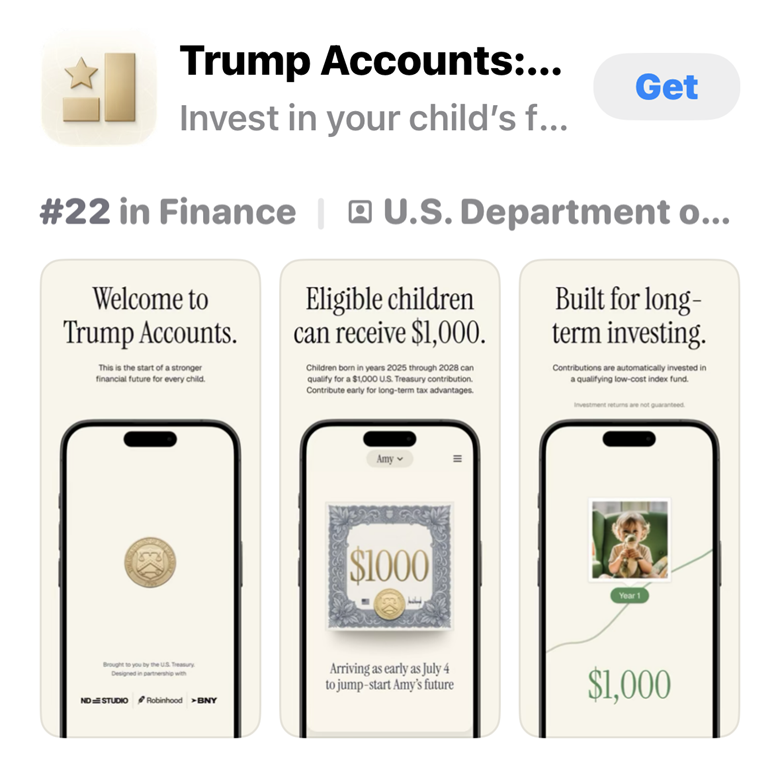
“This app is designed to be accessible for every household, ensuring that even our youngest shareholders can monitor their path to prosperity,” said Treasury Secretary Scott Bessent in a video posted on his X (formerly Twitter) social media account.
The Treasury emails also include instructions on how to complete the account setup process.
Then, in advance of the Trump Accounts’ official Independence Day launch, Treasury will follow-up with activation e-mails for enrolled families to help them get their plans earning as soon as possible.
IRS accounts option, too: The IRS noted in its Trump Account app announcement that new features added to taxpayers’ online individual accounts also provide access to the tax-advantaged savings option.
With a secure IRS.gov individual account, the IRS says taxpayers can securely complete common Trump Account tasks online, including —
- Electronically submit a Form 4547 to establish an account, and
- View the latest submission status of Form 4547, as well as the next steps the taxpayer needs to take in connection with the account.
“These new features reflect our continued focus on transforming the IRS into a digital-first agency that delivers a faster, more seamless experience for taxpayers and provides a new tax-advantaged investment account for children to save for college, retirement, and building generational wealth,” said IRS Chief Executive Officer Frank J. Bisignano.
What to expect if you have a Trump Account: If you’ve already signed your child (or children) up for a Trump Account, the Treasury elaborated on what to expect as we near the July 4 launch date.
First, be on the lookout for the Treasury email confirming that your election to open your child’s Trump Account was processed. As mentioned earlier, this message also will prompt recipients to complete account activation.
Treasury also emphasizes that parents should pay close attention to Trump Account emails. During this initial roll out period, activation emails will come only from no-reply@TrumpAccounts.Treasury.gov. If the sender has a different address, it likely is a scam. (There is more on avoiding Trump Account scams later in this post for more).
Once you get the official, legitimate Treasury email, follow the instructions in the email to set up your child’s Trump Account to complete account activation steps through the Trump Accounts app. You also can find this information at TrumpAccounts.gov.
Beginning July 4, your child’s Trump Account will be able to accept contributions from parents, family members, employers, and other eligible contributors, subject to annual limits.
Also starting July 4, children born between January 1, 2025 and December 31, 2028, will begin receiving a $1,000 pilot program contribution from the U.S. Department of the Treasury. It will be directly deposited directly to their Trump Account.
Setting up a Trump Account: If you haven’t yet signed up for a Trump Account, here are the plan highlights and steps to take.
Parents, guardians, and other authorized individuals can elect to open an account for a child who has not turned 18 at any time during the year.
There is no cost to open an account.
The account is fully in your child’s name, and the person who opens the Trump Account is the sole custodian until they turn 18.
You don’t have to contribute. But if you do, you can deposit up to $5,000 per year to maximize growth. The contribution limit will be adjusted for inflation starting in 2028.
Uncle Sam will kick in $1,000 for every U.S. child born between January 1, 2025 and December 31, 2028.
Employers, charitable organizations, and governments also can contribute money to Trump Accounts. A maximum of $2,500 can come from employers every year.
Funds will be invested in a diversified investment vehicle designed to maximize long-term growth while minimizing risk. Additional investment options will be added.
However, while they will be investment accounts, Trump Accounts will be treated like traditional IRAs once the young account holders are adults. That means the earnings will grow tax-deferred, and distributions will be taxed as ordinary income.
When the young people for whom the account was established turn 18, they can let the account continue to grow. Or they can withdraw funds without penalty (but still might owe tax) to pay educational costs, help buy a first home, or start a business.
Don’t fall for Trump Account scams: Like many other government-associated programs, Trump Accounts owners are prime targets for con artists who impersonate federal officials and agencies.
Don’t become one of their victims.
Again, make sure the Trump Account activation email is from no-reply@TrumpAccounts.Treasury.gov.
Remember, Treasury will not contact you by text message or phone call about activating a Trump Account. If you receive a call or text purporting actions to take here, do not respond.
Always access your child’s Trump Account by using the official Trump Accounts app or by typing TrumpAccounts.gov directly into your browser.
Customer support is available only through secure, in-app or online callback requests. Don’t use phone numbers found through internet search results.
When in doubt about an account communication, take a beat. Don’t feel pressured to immediately respond. Instead, visit TrumpAccounts.gov for the latest information.
You also might find these items of interest:
- Problems with Trump Savings for children
- 7 financial gifts for new graduates, some with tax benefits
- 529 plan changes under SECURE 2.0 should boost retirement savings
…
Advertisements
🌟 Search Amazon Tax Products 🌟
The text link above is an affiliate ad. If you click through and then buy a product, I receive a commission.